
OpenSCAD online · Upload and edit SCAD
OpenSCAD online editor: upload and edit your SCAD file
Upload your .scad file or paste existing OpenSCAD code, then describe the dimensions or features you want to change. Inspect the proposed source and model, and download the editable SCAD and the STL from a successful build. The example below shows an enclosure length changing from 120 to 160 mm.
The editor opens in OpenSCAD mode. Upload your main .scad file or paste its code; add any dependencies separately.
How can I open and edit a SCAD file online?
The useful question is often small and specific: can this enclosure be longer, can a spacer have a different bore, or can a mounting pattern move without rebuilding the entire design? OpenSCAD source lets you change how a model is constructed. PurCad puts that source, its compiled preview, named parameters and version history in one workspace.
Upload → describe the change → inspect the source and model → download.
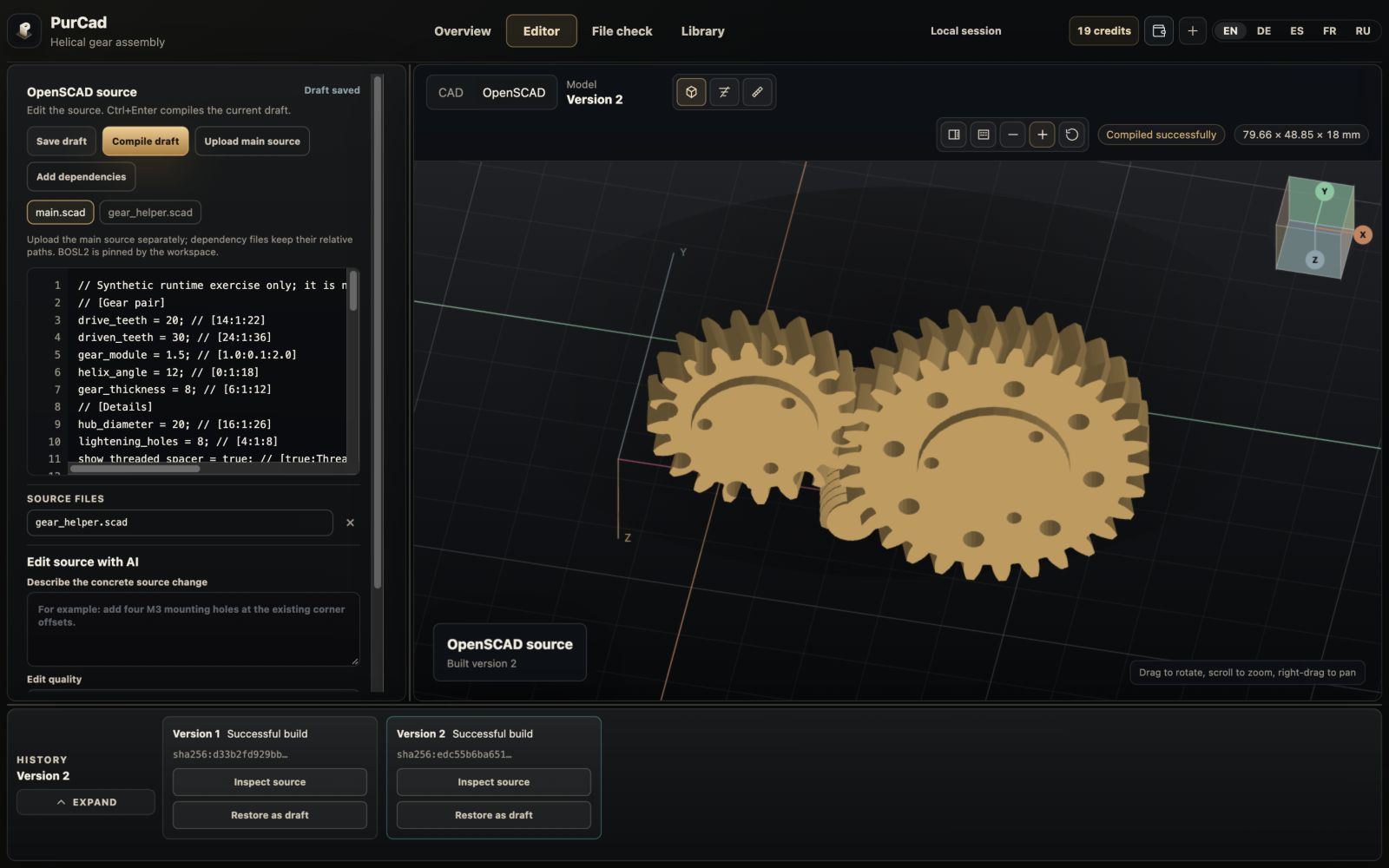
A SCAD file describes a model through code; an STL stores a triangulated surface. Editing the SCAD can preserve the construction rules that produced the part. The OpenSCAD project describes this script-to-model approach in its own documentation.
These are actual captures of the English PurCad interface. The models are authored demonstrations, not mechanically certified designs.
How do I upload a SCAD file with its dependencies?
Open the OpenSCAD editor from this page and use Upload main source, or paste your code into the source editor. Upload the main file separately from its dependencies. If the code includes lib/enclosure.scad, add that file under the same relative path. A renamed or missing helper can stop a model from compiling even when the main file looks complete.
The workspace accepts .scad source files. The main file and each dependency can be up to 256 KiB; dependency uploads are limited to 32 files and 1 MiB in total. It is not a general upload for every external asset a desktop OpenSCAD project might reference. Check the project's file list before assuming a single SCAD contains everything.
Compile once before changing the design
Use Compile draft, or Ctrl+Enter, to build the imported source. Confirm that the initial model appears and that its dimensions make sense. This gives you a known starting point: if the first build fails, resolve its diagnostic before introducing a design change. Saving code and compiling geometry are separate states.
How do I change dimensions in a SCAD file?
The enclosure example contains a body, a separate lid, ventilation slots, ribs and screw posts. Its main source exposes length, width, height and wall as named values. We changed length in Customizer from 120 to 160; PurCad saved that value into the source and rebuilt the geometry.
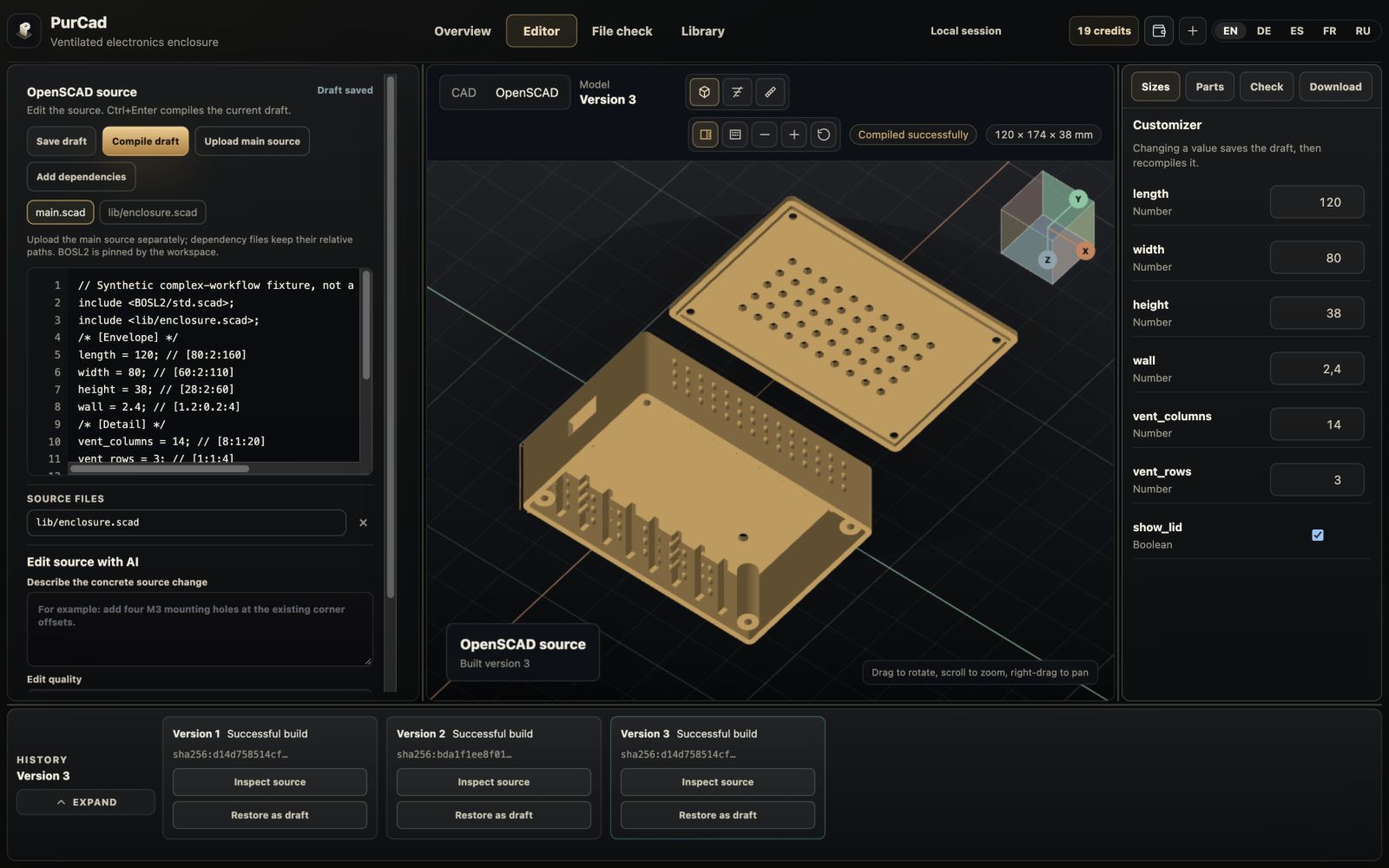
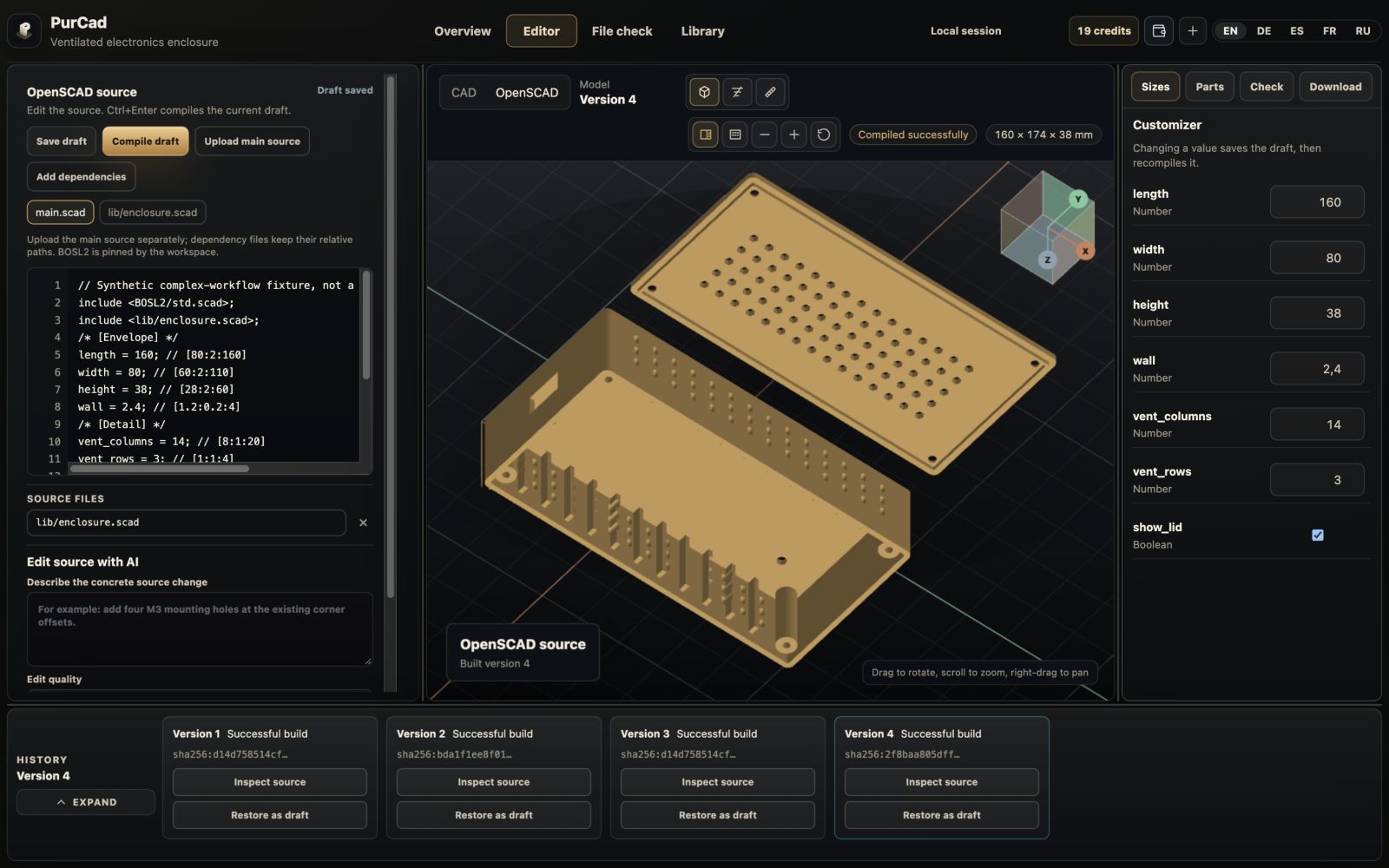
The overall displayed bounds changed from 120 × 174 × 38 mm to 160 × 174 × 38 mm. The 174 mm span includes the body-and-lid arrangement; it is not the width parameter, which remains 80. The wall parameter remains 2.4. These are source and build observations, not measurements of a printed part.
Versions 3 and 4 were compiled for this comparison without a fresh geometry-validation report. The images demonstrate that the parameter changed the source and model; they do not establish fit, strength or printability.
How do I describe a change to an existing SCAD model?
Describe the change you need and specify the dimensions and features that must stay unchanged. For example, give the new enclosure length and name the mounting holes and wall thickness to preserve. PurCad compiles the proposed source before presenting the candidate.
Example request: “Increase the enclosure length to 160 mm. Keep the width at 80 mm, the wall thickness at 2.4 mm and the screw-hole diameters unchanged.” Compare the proposed source and rebuilt geometry with the original, including the features you asked to preserve.
Review the proposed source and geometry. AI edits use credits and can fail; a failed candidate does not replace the editable draft. A provider attempt may still incur a charge.
Find the operation behind a visible feature
The source-operation tools can show a detected operation's preview and its file and lines. Use that to orient yourself in a larger file or helper module. An operation preview is not a promise that every triangle in the final mesh maps uniquely to one line of code; Boolean operations and repeated modules make that relationship more complicated.
Keep useful builds in the version history. Inspecting historical source is read-only; restore a version as a draft when you want to edit from it. Before exporting, check that the visible geometry belongs to the current successfully built draft.
Why won’t my SCAD file compile or update the preview?
When compilation fails, PurCad can keep the previous successful preview visible. That continuity is useful, but it is easy to mistake the old geometry for the newly edited code. Read the build status: an earlier preview is marked as stale, and a matching successful build is required for the current draft's STL download.
| What you see | What to do next |
|---|---|
| Syntax error with a file and line | Open the indicated source location. Check the statement and nearby braces or punctuation, then compile again. Start with the reported location instead of changing unrelated dimensions. |
| Missing dependency or undefined call | Check the named include/use file, relative path and library API. Add the required .scad helper; do not assume that an unavailable function is a geometry defect. |
| A value has no Customizer control | The controls come from supported literal top-level values and annotations. Edit the source directly when the value is computed, nested or not exposed as a supported parameter. |
| Build exceeds its limit | Reduce expensive detail or simplify the construction, then rebuild deliberately. The online runtime has resource limits; not every arbitrarily complex desktop project will complete. |
| The model looks unchanged after editing | Check whether the draft is saved and compiled, whether the preview is stale, and whether the changed value actually participates in the relevant construction. An unchanged image alone does not tell you which case occurred. |
Can I use BOSL2 and multi-file OpenSCAD projects?
BOSL2 is available as a pinned library in the workspace. The gear example combines source files with library geometry and produces a 31,512-triangle model. That is evidence that this example compiled; it does not prove that every BOSL2 model or library revision is interchangeable.
Keep your own dependency names and relative paths intact. When transferring a project, keep the source package and its runtime/library metadata together. A package for a historical version may be unavailable if its required runtime or library revision is no longer available; do not silently substitute a different dependency.
How do I check the exported STL before 3D printing?
Successful compilation means the source produced geometry. It does not prove that walls are thick enough, surfaces do not intersect or a lid fits. Use the Check tab's validation action to open the built STL in File check, review the quoted cost and run the applicable geometry checks for that version.
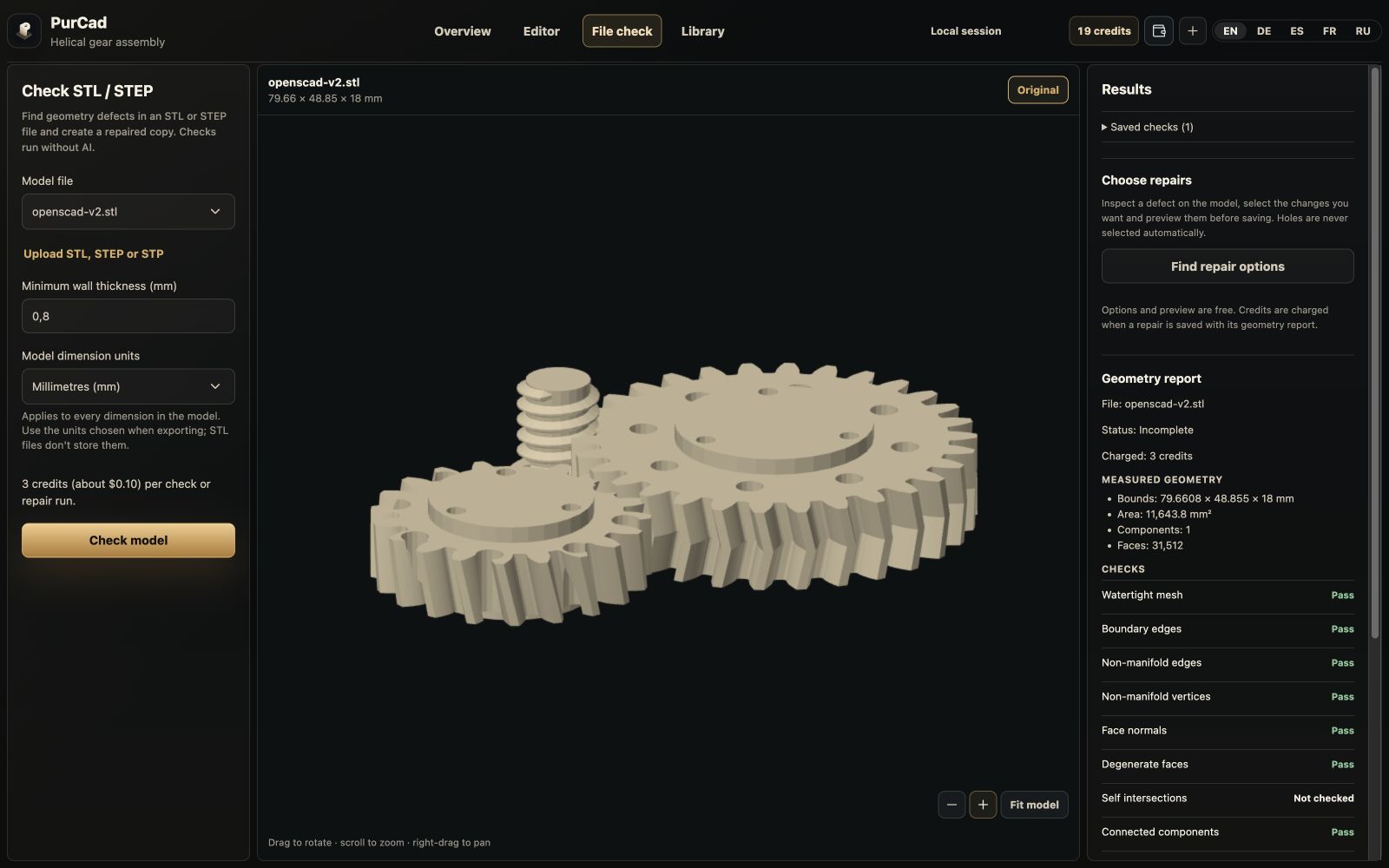
Read each result, including Not checked and Incomplete. If you edit the source again, the older report does not validate the new geometry. If you repair the STL mesh, that repair does not rewrite your OpenSCAD source; make a source edit when the construction itself needs to change.
How do I export SCAD to STL and keep the source?
Use the Download tab once the draft has a matching successful build. Keep the source alongside the exported mesh so that the next dimensional change starts from the construction rules rather than from triangles alone.
| Download | What it contains |
|---|---|
| SCAD source | The editable main source, including parameter values materialized by Customizer. A source draft can be saved without a successful build; the SCAD file alone does not prove that it compiles. |
| Compiled STL | The mesh from the successful build. STL export is unavailable when the current draft is stale or failed. Inspect the file in your slicer and confirm scale before printing. |
| Source package | The main source, uploaded .scad dependencies, runtime metadata and bundled BOSL2 when available. Prefer this package for a multi-file design; downloading only main.scad would omit its helper files. |
Questions about editing SCAD online
Can I use OpenSCAD code I already got from ChatGPT?
Yes. Paste the existing code or upload its .scad file in PurCad's OpenSCAD mode. Add any referenced helpers, compile it and inspect the result here. A plausible-looking script can still contain errors or assumptions you need to correct.
Do I need to edit code to change a dimension?
You can describe the new dimension in your request to edit the uploaded source. Specify which dimensions and features should stay unchanged, then inspect the proposed source and model before keeping the change.
Can I turn an STL back into the original SCAD?
This workflow starts with SCAD source. An STL does not retain the original variables, modules or construction history, and PurCad does not promise to reconstruct them. Use the file-check workflow for mesh inspection and supported mesh repairs.
Does the OpenSCAD workspace export STEP?
Its downloads are SCAD, STL and a source package. It does not offer STEP export for arbitrary SCAD geometry. PurCad's native CAD workflow is separate and has its own export formats.
Open your SCAD file and make the next change
Upload your SCAD source and describe the change you need. Compare the proposed source and rebuilt model with the original, then keep both the editable source and the STL you intend to use.
Sources and example evidence
The screenshots document actual source edits and builds in PurCad. The enclosure comparison uses the same camera angle and zoom before and after. Technical background is available in the OpenSCAD and BOSL2 project documentation.